
Business Details
16 Years
experience
Your Complete Design Toolkit for macOS
At Sketchpad, we are dedicated to empowering designers through intuitive, powerful tools tailored specifically for macOS. Founded in 2010, our journey has been driven by a singular focus: creating a design environment that prioritizes creativity over complexity. As an independent company, we make decisions that align with the needs of the design community rather than external pressures. Our product reflects deep expertise in UI/UX design, offering flexible vector editing, seamless prototyping, and robust collaboration features.We champion privacy by collecting minimal analytics and ensuring your data remains under your control. Our commitment to transparency extends to straightforward pricing modelswhether through perpetual licenses or cloud-enabled subscriptions. With over a decade of experience, we continuously refine our tools to meet evolving industry demands while maintaining a clean, distraction-free interface that lets your ideas take center stage.


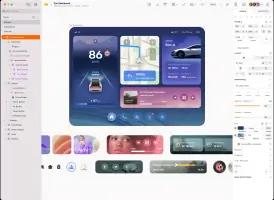
Services
UI/UX Design
Prototyping
Collaboration
Developer Handoff
Design Templates
Vector Editing
Cloud Storage
Offline Design
Asset Export
Details
- Year established: 2010
Highlights and features
- Independent company prioritizing designer needs
- Privacy-focused with minimal data collection
- Intuitive interface and powerful design tools
- Flexible licensing options
- Mac-native performance and offline capabilities
What people say
Easy and wonderful
Indispensable
Design with little limitation
Love the simplicity
Continuously improving
Services
UI/UX Design
Sketchpad offers precision vector editing for interface and user experience design. Our tools enable creation of icons, app interfaces, and responsive layouts. Features like nested frames and smart layout ensure flexibility without compromising control, making it ideal for designers seeking efficiency and creative freedom.
Prototyping
Create functional prototypes with transitions, animations, and interactive elements. Sketchpad's prototyping tools allow designers to simulate user flows and test concepts directly within design files. Features like overlay modals and scroll areas help validate ideas quickly, accelerating the design process while maintaining fidelity to original designs.
Collaboration
Enable real-time co-editing and seamless feedback workflows. Sketchpad's collaboration features let teams share design libraries, manage version control, and gather stakeholder input in one unified workspace. Guest access and permission management ensure secure collaboration without additional costs for existing license holders.
Developer Handoff
Streamline the transition from design to development with built-in inspection tools. Developers can access CSS, Swift, or Android code snippets, download assets, and view responsive layouts directly from design files. Export tokens and style guides maintain consistency across implementations while reducing manual documentation efforts.
Design Templates
Access hundreds of pre-built templates and component libraries to accelerate project timelines. Our template collection spans mobile apps, web interfaces, and design systems, providing a foundation for consistent, efficient workflows. Customizable libraries ensure teams maintain brand standards across projects without repetitive setup.
Questions
What operating systems does Sketchpad support?
Sketchpad requires macOS 14.0.0 (Sonoma) or newer. It is a native Mac application with offline capabilities.
How does Sketchpad handle user data privacy?
We collect minimal analytics, use no tracking cookies, and guarantee your design files remain private unless explicitly shared. Your data ownership is preserved.
Can teams collaborate in real-time with Sketchpad?
Yes, Sketchpad supports real-time co-editing, shared workspaces, and comment threads for team collaboration without additional guest license fees.
What prototyping features are available?
Create interactive prototypes with modals, scroll areas, Smart Animate transitions, and multi-directional interactions. Test prototypes directly in browsers or mobile devices.
How does Sketchpad differ from other design tools?
We focus exclusively on macOS optimization, prioritize privacy, and maintain straightforward licensing. Our toolset balances power with simplicity for professional designers.